
Product Page
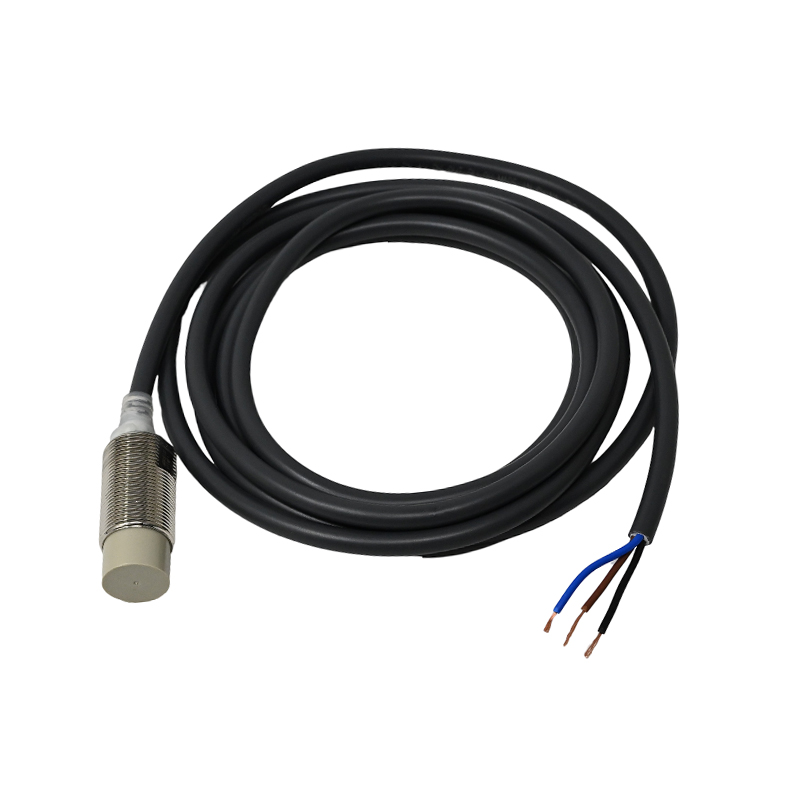
Proximity Sensor E2E-X10ME1 OMRON
₨0
Need some help?
Contact Us
Product Ships in
2-3-business Days
Payment Methods:
Proximity Sensor E2E-X10ME1 OMRON in Lahore Pakistan
Product Details: Omron E2E‑X10ME1 Proximity Sensor
Key Specifications
-
Type: Inductive proximity sensor, unshielded, cylindrical M18 housing omron.keal.com.bd.
-
Sensing Distance: 10 mm ±10% (effective detection up to ~8 mm) omron.keal.com.bdElectronics Hub.
-
Output: NPN, 3-wire, normally open (NO) omron.keal.com.bdkwoco-plc.com.
-
Supply Voltage: 10–30 VDC (12–24 V typical), with ±10% ripple tolerance omron.keal.com.bdElectronics Hub.
-
Current Consumption: Max. 13 mA omron.keal.com.bdElectronics Hub.
-
Switching Capacity: Up to 200 mA omron.keal.com.bdElectronics Hub.
-
Indicator: Red LED shows operation status omron.keal.com.bdElectronics Hub.
-
Protection: Features surge suppression, reverse-polarity protection, and short-circuit protection omron.keal.com.bd.
-
Durability:
-
Operating temp: –40 °C to 85 °C; Storage: same range omron.keal.com.bdElectronics Hub.
-
Humidity: 35–95% RH, no condensation omron.keal.com.bdElectronics Hub.
-
Vibration: withstands 10–55 Hz with 1.5 mm amplitude, 2 h per axis omron.keal.com.bd.
-
Shock: 1,000 m/s², 10 times per axis omron.keal.com.bd.
-
-
Ingress Protection: IP67 – fully dust-tight and waterproof to one meter omron.keal.com.bdElectronics Hub.
-
Construction Materials:
-
Body: Brass with nickel plating
-
Sensing face: PBT
-
Nuts: Nickel-plated brass
-
Washer: Zinc-plated iron omron.keal.com.bdElectronics Hub.
-
-
Cable: Pre-wired with 2 m cable length; includes nut and washer accessories omron.keal.com.bdElectronics Hub.
-
Weight: Approx. 150 g (packaged) omron.keal.com.bd.
Features & Advantages
-
Reliable Detection: Great for industrial automation tasks like RPM measurement, positioning, and conveyors—detects metallic (ferrous) objects reliably Electronics Hub.
-
Durable Design: Built to endure harsh environments, with high ingress protection, vibration/shock resistance, and broad temperature tolerance.
-
Clear Visual Feedback: LED indicator ensures easy visual confirmation of detection.
-
Enhanced Safety: Protective features guard against wiring mistakes and electrical faults.
-
Simple Installation: M18 threaded body with included mounting hardware makes installation straightforward.
-
Energy Efficient: Low current draw and efficient switching output.
How to Use It
1. Installation
-
Mount the sensor using the M18 threaded body; secure it with the included nuts and washer.
-
Ensure the sensing face is aimed toward the ferrous target (recommended: iron 30×30×1 mm) within ~8 mm range.
2. Wiring
-
Identify three wires: V+ (typically brown), Output (black), and Ground (blue).
-
Connect V+ to 12–24 V DC supply.
-
Connect the output to your control system (PLC/discrete input).
-
Ensure proper wiring polarity and confirm that output and supply lines are connected correctly.
3. Testing & Adjustment
-
Power the sensor; LED should light when a metal target enters the sensing range.
-
Test different distances to find threshold where LED turns ON/OFF.
-
If using multiple sensors nearby, ensure proper spacing to avoid cross-interference.
4. Operation
-
During operation, the red LED signals detection status.
-
The output switches (NO) when the metal enters range, returning to OFF when it's removed.
5. Maintenance
-
Clean sensor face if contamination (dust, oil) accumulates.
-
Periodically check mounting tightness and cable integrity.
-
Replace sensor if LED or output response becomes inconsistent.
Suggested Website Content Structure
Product Title:
Omron E2E‑X10ME1 — 10 mm DC Inductive Proximity Sensor (NPN, NO, 3‑Wire, Unshielded)
Overview:
Compact, durable, and reliable. The E2E‑X10ME1 delivers precise metal detection in industrial applications, with robust design for lasting performance.
Specifications:
-
Sensing distance: 10 mm ±10% (effective ~8 mm)
-
Output: NPN, 3‑wire, Normally Open
-
Supply voltage: 10–30 VDC; current consumption: 13 mA
-
Switching capacity: up to 200 mA
-
Indicator: red LED
-
Protection: surge, reverse polarity, short-circuit
-
Temp: –40 to 85 °C; Humidity: 35–95% RH
-
Vibration: 1.5 mm @ 10–55 Hz; Shock: 1,000 m/s² (10×)
-
IP rating: IP67
-
Cable: 2 m pre-wired; includes nuts and washer
Key Features:
-
Rugged brass M18 housing designed for harsh industrial settings
-
Dependable performance in automation tasks like conveyor systems and positioning
-
Easy visual feedback via LED indicator
-
Safe, foolproof wiring with protective circuits
-
Straightforward installation
Usage Guide:
-
Position and secure the sensor within 8 mm of the metal target.
-
Wire V+, output, and ground correctly.
-
Test LED response by moving a test metal target.
-
Monitor LED during operation for detection confirmation.
-
Perform regular checks and keep the sensor face clean for consistent results.


